PocketAdmin The source of truth for every network you run.
Now with an AI that does the legwork. Ask about your network in plain words: it looks at your switches, firewalls and servers, finds what’s wrong, and by default asks for Face ID before it changes anything. It never sees your passwords, SSH keys or API tokens. PocketAdmin signs in for the AI. Every tool is free, and anyone can try the AI free each month.
iPhone & iPadAI with Face ID60+ ToolsSSH TerminalMCP ServerTeams
Ask the AI about your network. It finds what’s wrong, and by default asks for Face ID before it changes anything. Pro adds a bigger allowance and your own models: Apple’s on-device model, your own API key, or a model on your own hardware. With Pro, PocketAdmin is also an MCP server: connect Claude, ChatGPT, Cursor or any MCP client, and it reaches only the devices you choose.
Launch prices through December 31: subscribe to Pro or a Team plan by then, and your price stays for as long as you stay subscribed, even after prices go up on January 2.
New versions and the odd tip. No spam, unsubscribe anytime.
// Ask the AI New in 1.4
It does the legwork. You approve the changes.
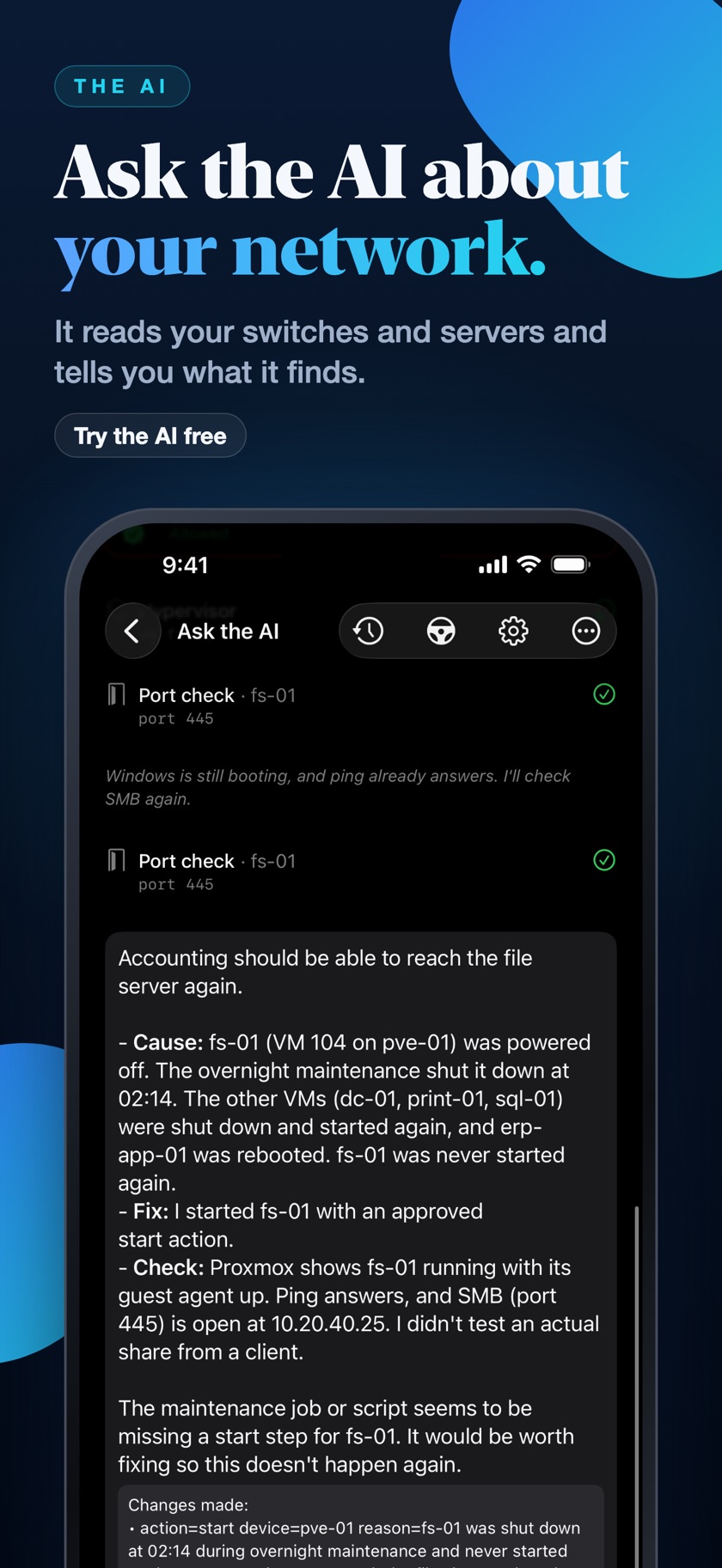
Ask “Why is the file server slow?” or “Did last night’s backups run?” The AI reads your devices first, then answers, and it works in the site you’re in. You decide what it can reach, and nothing changes without you.
You hold the keys
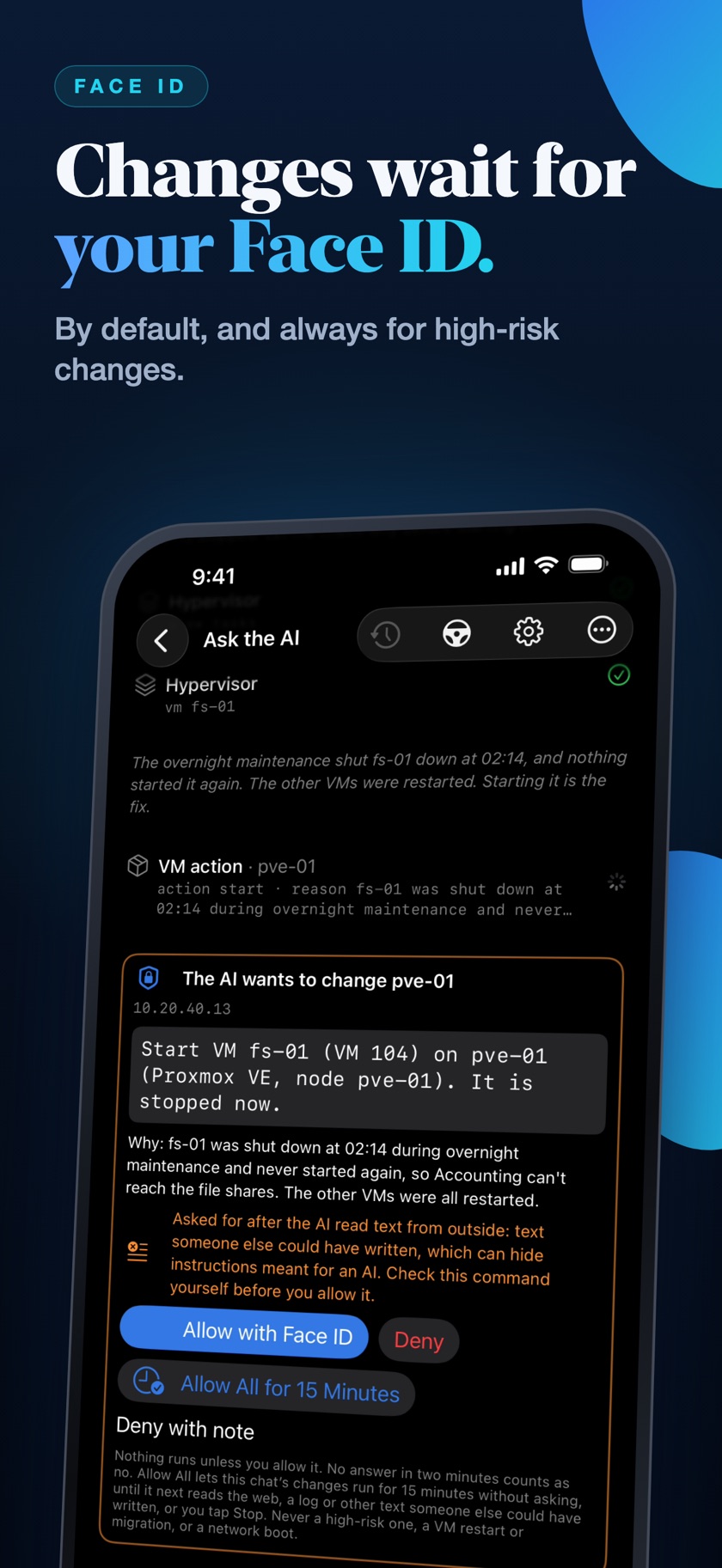
Each device is Off, Look, or Look & Change. Changes wait for your Face ID by default, and high-risk ones always do.
It never sees your secrets
PocketAdmin signs in for the AI. Your passwords, SSH keys and API tokens stay in the iOS Keychain.
The built-in AI works with no setup. With Pro, use Apple’s on-device model, your own API key, or a model on your own hardware, with no limit.
An MCP server, too
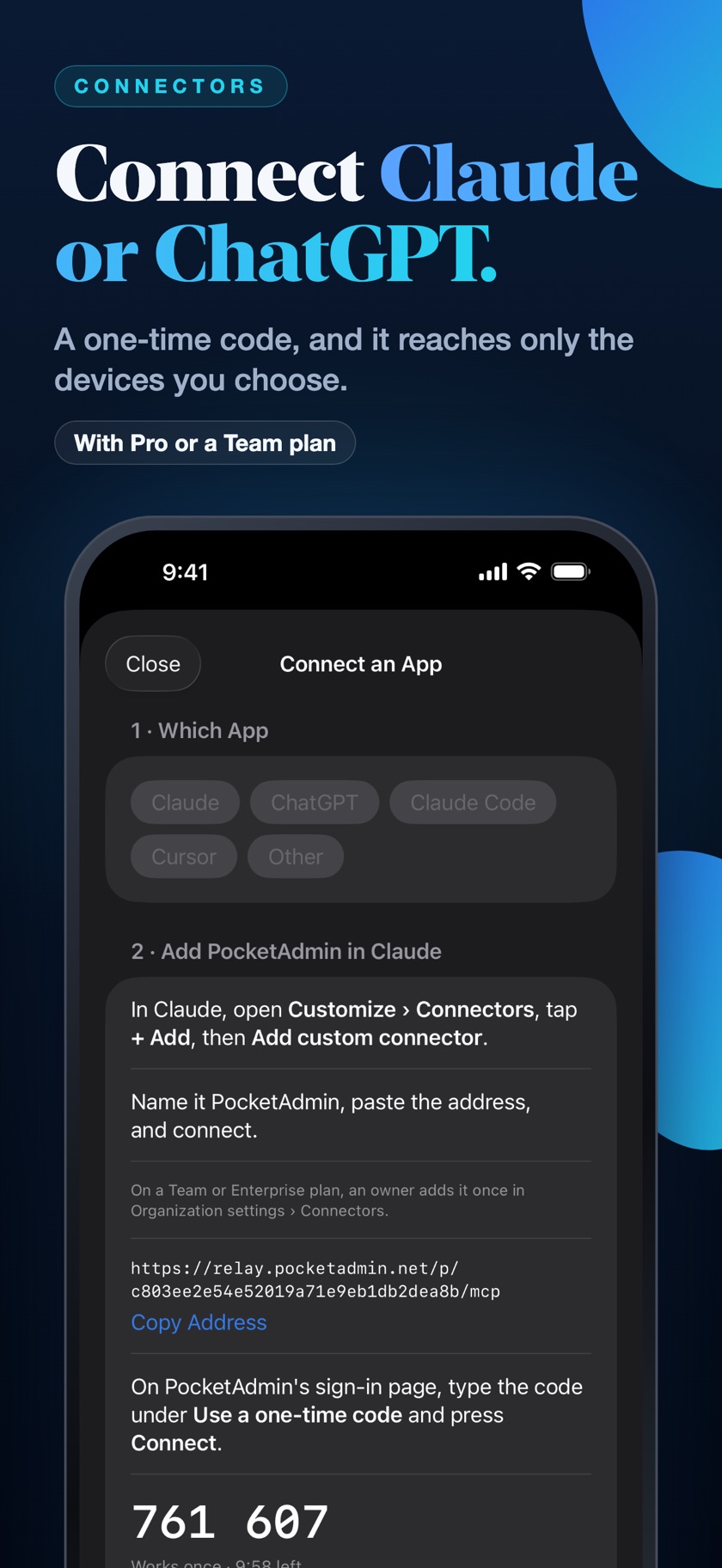
With Pro, connect Claude, ChatGPT, Cursor or any MCP client with a one-time code, and it reaches only the devices you choose.
Watch it work
In Drive mode the AI uses PocketAdmin’s own screens while you follow along. Activity shows the commands it ran.
Show it the problem
Attach a photo to a chat, like a cable label or an error on a screen.
Launch price · through Dec 31
Pro
$9.99 a month
Kept for as long as you stay subscribed
or $79.99 a year
Yearly saves 33%
From January 2: $14.99 a month or $119.99 a year
One week free.
Switching between monthly, yearly or another plan moves you to that plan's current price.
✓
The AI on every device you allowLook, or Look & Change.
✓
Included AI, no setupOr bring your own model.
✓
MCP serverConnect the AI app you already use.
✓
Every tool stays freeNo account, no ads.
Payment is charged to your Apple ID. A subscription renews automatically unless it is cancelled at least 24 hours before the end of the current period; manage or cancel it in your Apple ID settings. Cancel during the free week and you pay nothing. A Team plan includes Pro for its owner and the AI for everyone on the team. See the Terms of Use and Privacy Policy.
// Features
The whole toolbox, in one app
Every tool is free, with no account to make. Save a switch, server or access point once and every tool that can reach it picks it up. You can try the AI free, and Pro and Team plans give it a bigger allowance.
Network Diagnostics
Ping, traceroute, Test-NetConnection, nslookup, a port scanner and an HTTP/TLS checker, plus the ones that find odd faults: Path MTU, NTP clock skew and a rogue-DHCP probe. iperf3 and a speed test for throughput.
Remote Access
A real SSH terminal that runs vim, top and tmux, with SFTP and port forwarding. Verify Servers checks every server's SSH key in one go and trusts the new ones with a single Face ID. RDP, VNC and Telnet, and a REST client with presets for Redfish, UniFi and Proxmox.
Switches & Topology
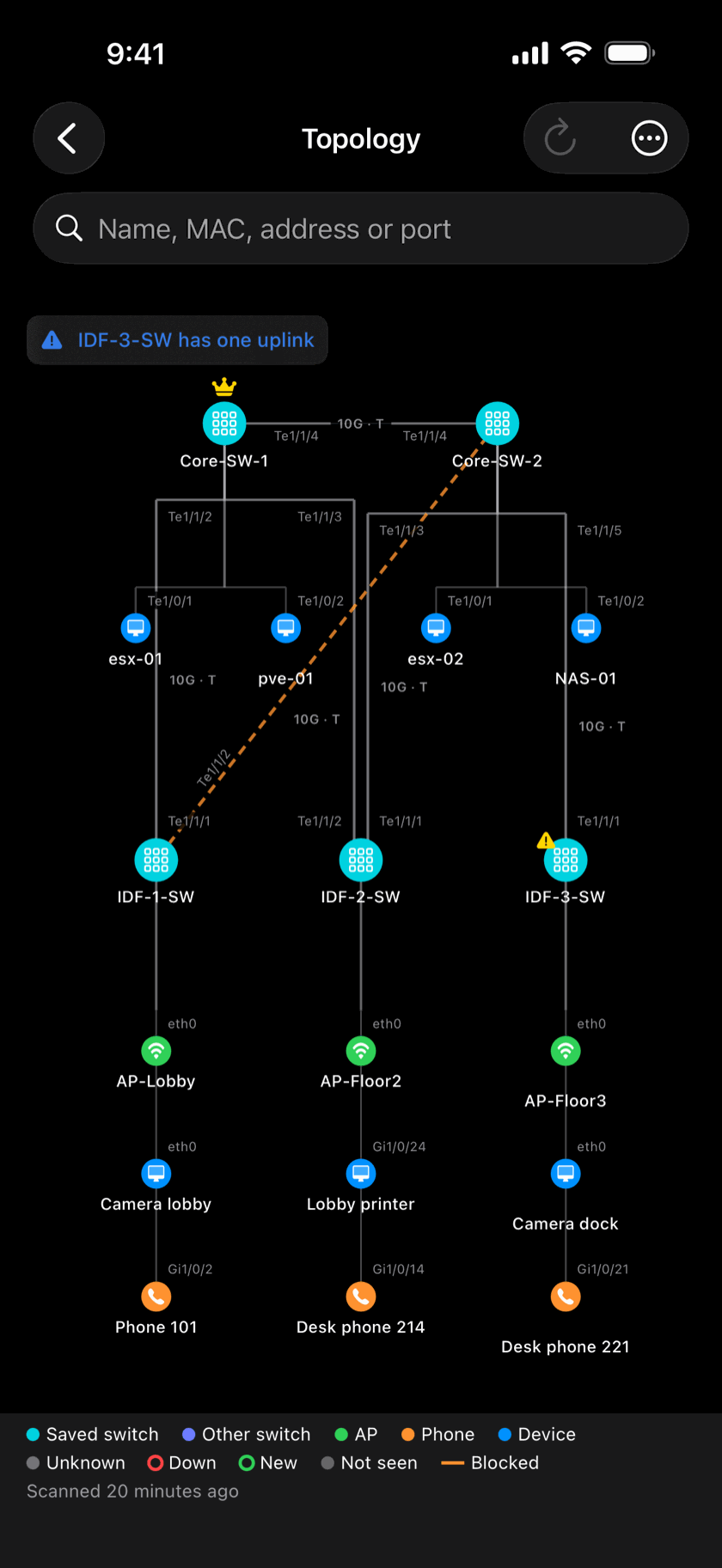
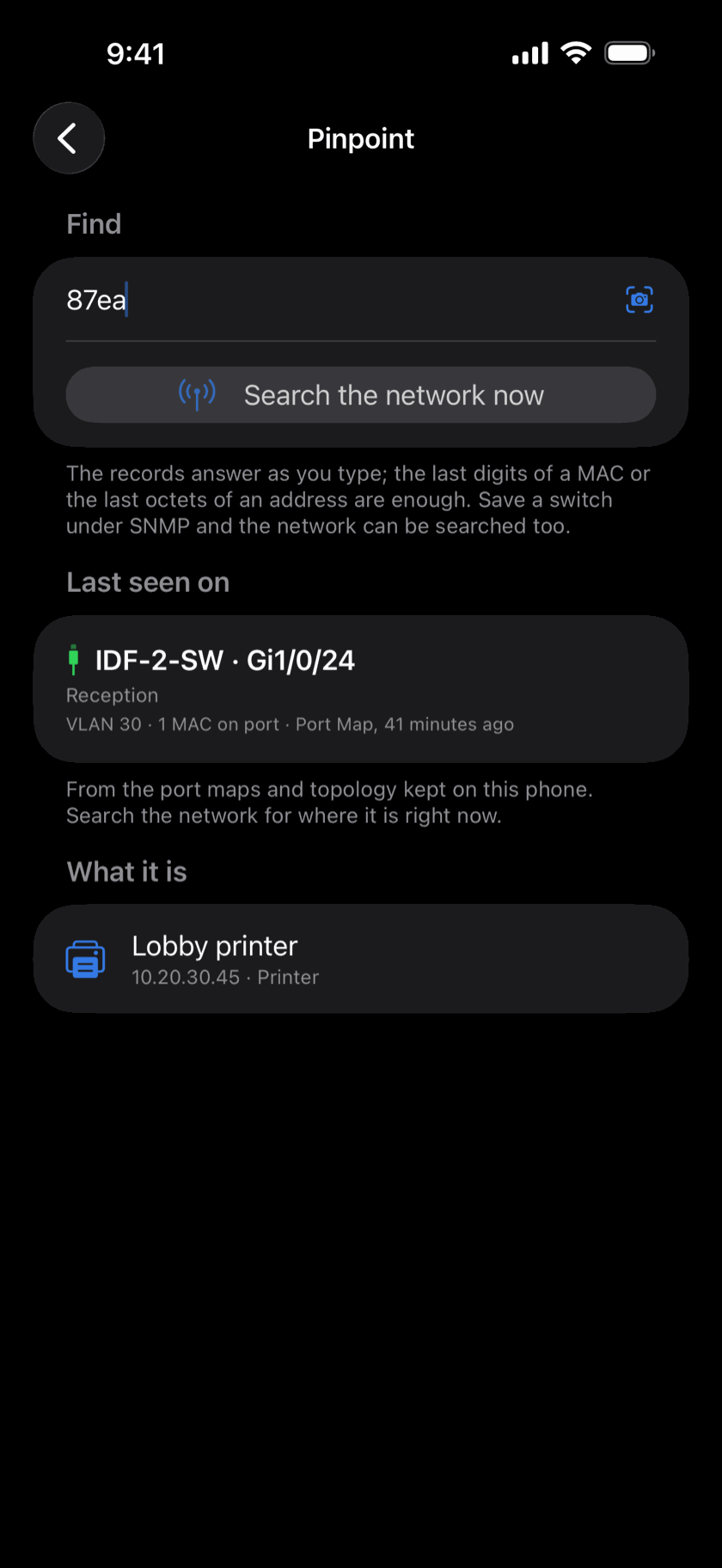
SNMP, and a Port Map that shows what's plugged into every port and can shut a port, cycle PoE or set a label. Topology draws the Layer 2 map from LLDP and CDP, and Pinpoint traces an IP or MAC to its switch port.
Servers & Hypervisors
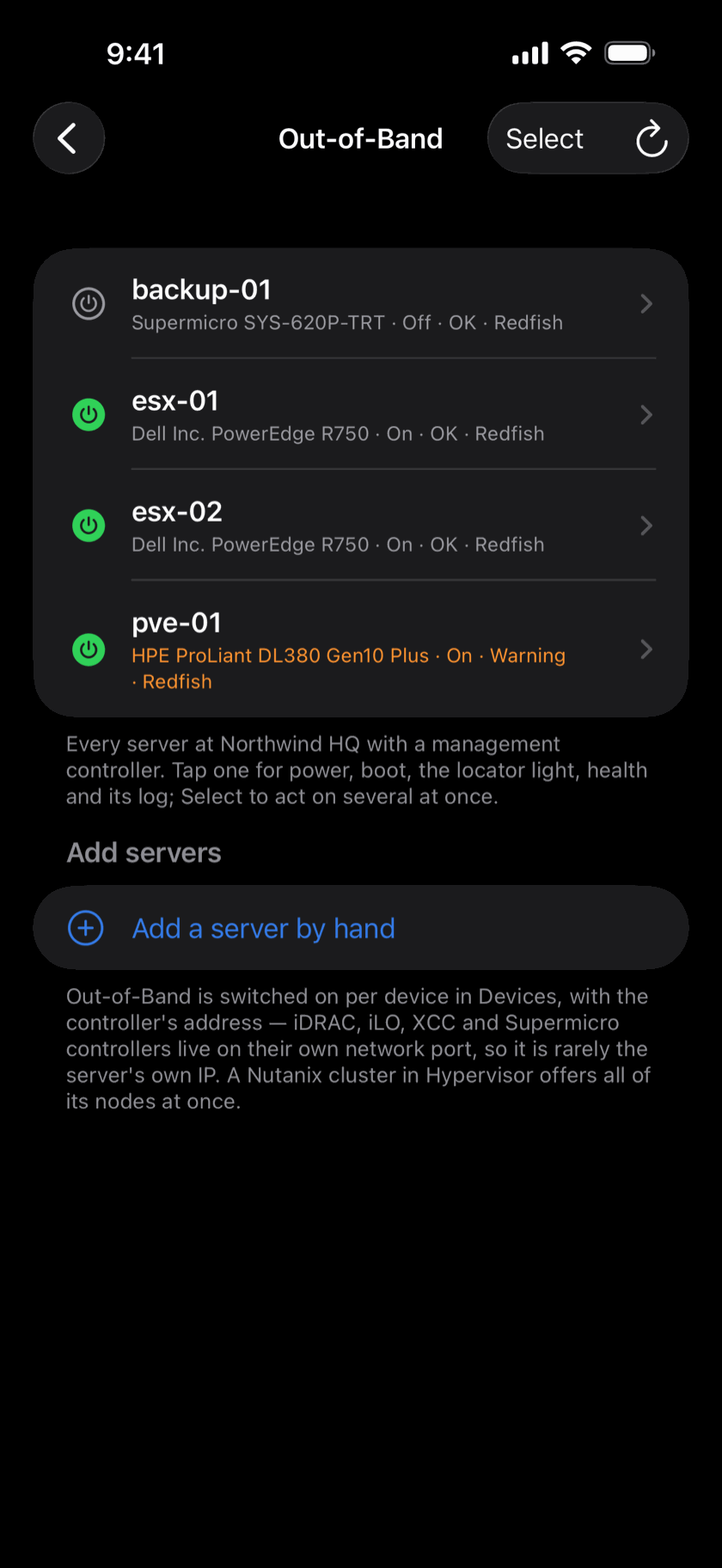
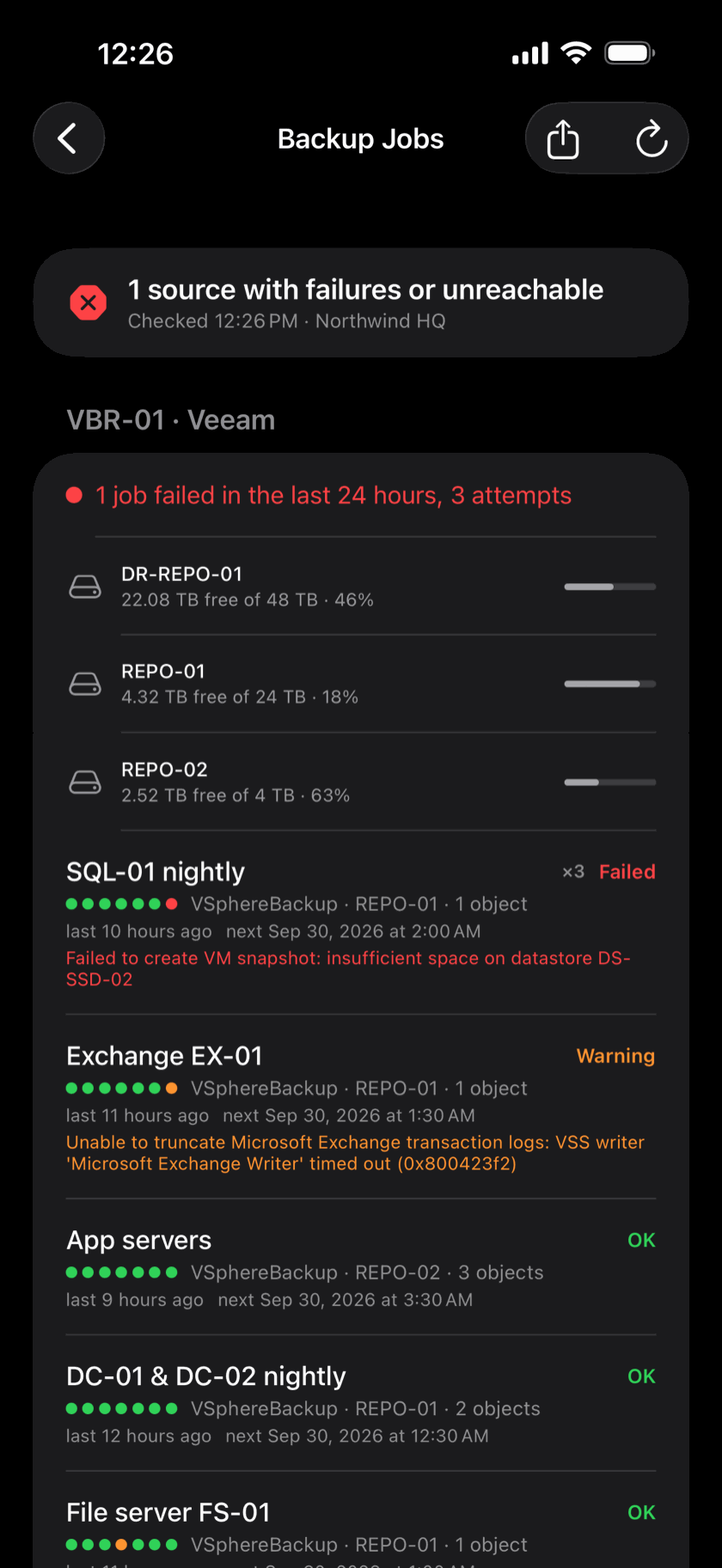
Out-of-Band talks Redfish to iDRAC, iLO and XCC: power, next boot, the locator light, health and the KVM console. Hypervisor manages Proxmox, vSphere and Nutanix guests. Backup Jobs says whether last night's backups ran, from Veeam, Proxmox, Nutanix, Synology, Rubrik and more.
Inventory & IPAM
Sites and devices entered once, an IP manager for every subnet, serials and firmware read over SNMP, and running configs kept with a diff between any two revisions.
Watch & Run at Scale
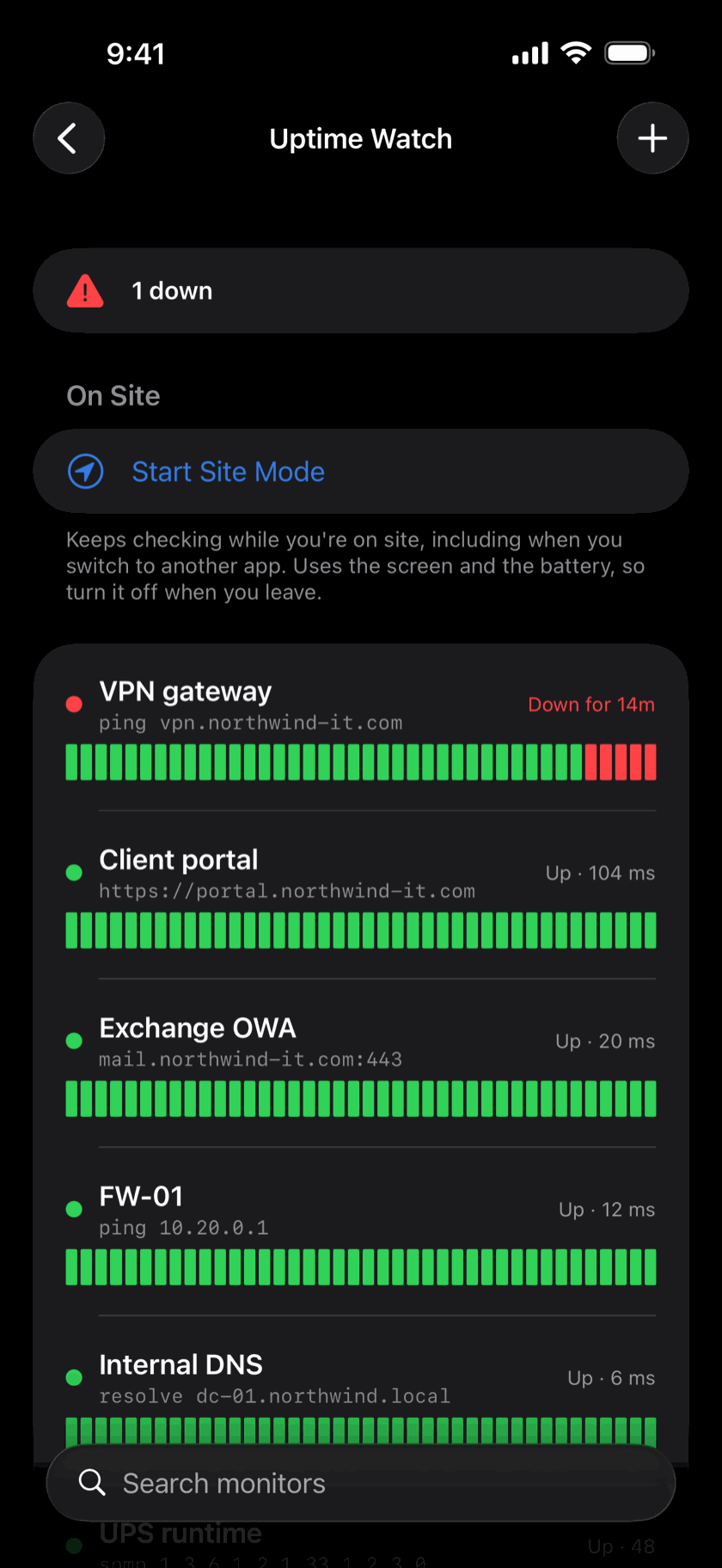
Bulk Run sends one command to many devices and groups the answers. Uptime Watch checks HTTP, TCP, ping, DNS and SNMP values, and a monitor can be kept to the Wi-Fi networks or VPN that reach it. Expiry Watch warns before certificates and domains lapse. The phone can also receive syslog and SNMP traps.
Security Checks
Vulnerabilities matches the software your gear reports against known CVEs, exploited ones first, and shows its evidence. It can alert you when a new one matches a device. Builds from Ubuntu, Debian, Red Hat and Fedora show as possibly patched, because those distributions often fix a flaw without changing the version. Domain Health audits SPF, DKIM, DMARC and DNSSEC. Plus packet-capture, certificate and JWT readers.
Passwords
One vault for logins with one-time codes, Wi-Fi networks you can join from the entry, SSH keys, API tokens, cards and notes. Face ID to reveal or copy. Imports a Bitwarden export.
Files & Photos
The ISP contract and floor plan filed under the site, the manual under the switch, rack photos and clips with them. Scan a page, mark up a PDF, and keep a Personal shelf that never leaves the phone.
Wi-Fi & On Site
Network info, live latency and traffic graphs, link metrics, roaming forensics and LiDAR coverage maps. AR measuring for cable runs, an NFC reader, a sound meter and a Bluetooth scanner.
Directory & Utilities
Search, unlock and reset Active Directory accounts through the AD Toolkit backend. A subnet calculator, Base64, URL, epoch and UUID converters, hashes and a QR generator.
Private & Secure
No account and no ads or analytics SDKs. Your devices, logins and files stay on your phone and in your own iCloud, secrets in the iOS Keychain, and Face ID can lock the whole app. The AI sees only what it reads from the devices you allow, never your passwords, and our servers never keep what you ask it. Teams sync through iCloud, never through our servers.
No phone handy? Some of the tools run in your browser too: a MAC address lookup, an SPF, DKIM and DMARC check, and a CVE check. No sign-up. Free tools →
// Teams AI for the whole team
One inventory. Everyone on it.
Make a team, file sites under it, and every device, login, file and map at those sites is on the phone of everyone you invite, and stays that way. Add a switch standing in the closet and it's on everyone's phone before you've climbed down. It syncs through Apple's iCloud, with passwords encrypted end to end. Everyone on the team gets the AI, from a shared allowance.
Launch price · through Dec 31Kept for as long as you stay subscribed
Team 5
Up to 5 people
$29.99 a month
or $239.99 a year
Yearly saves 33%
From January 2: $39.99 a month or $319.99 a year
Team 15
Up to 15 people
$59.99 a month
or $479.99 a year
Yearly saves 33%
From January 2: $79.99 a month or $639.99 a year
Team 50
Up to 50 people
$149.99 a month
Monthly only
From January 2: $199.99 a month
Launch prices through December 31, kept for as long as you stay subscribed. Switching between monthly, yearly or another plan moves you to that plan's current price. First month free on every size, monthly or yearly. Members join free, and one subscription covers every team you own. A size counts everyone across those teams, you included, and invitations not yet accepted. More than 50 people? Email support@pocketadmin.net.
✓
The same picture on every phoneSites, devices, IPAM, port maps and topology maps.
✓
Passwords, safely sharedSSH, SNMP, RDP and vault entries travel encrypted end to end.
✓
You decide who changes whatView only, can edit, or admin, set per person.
✓
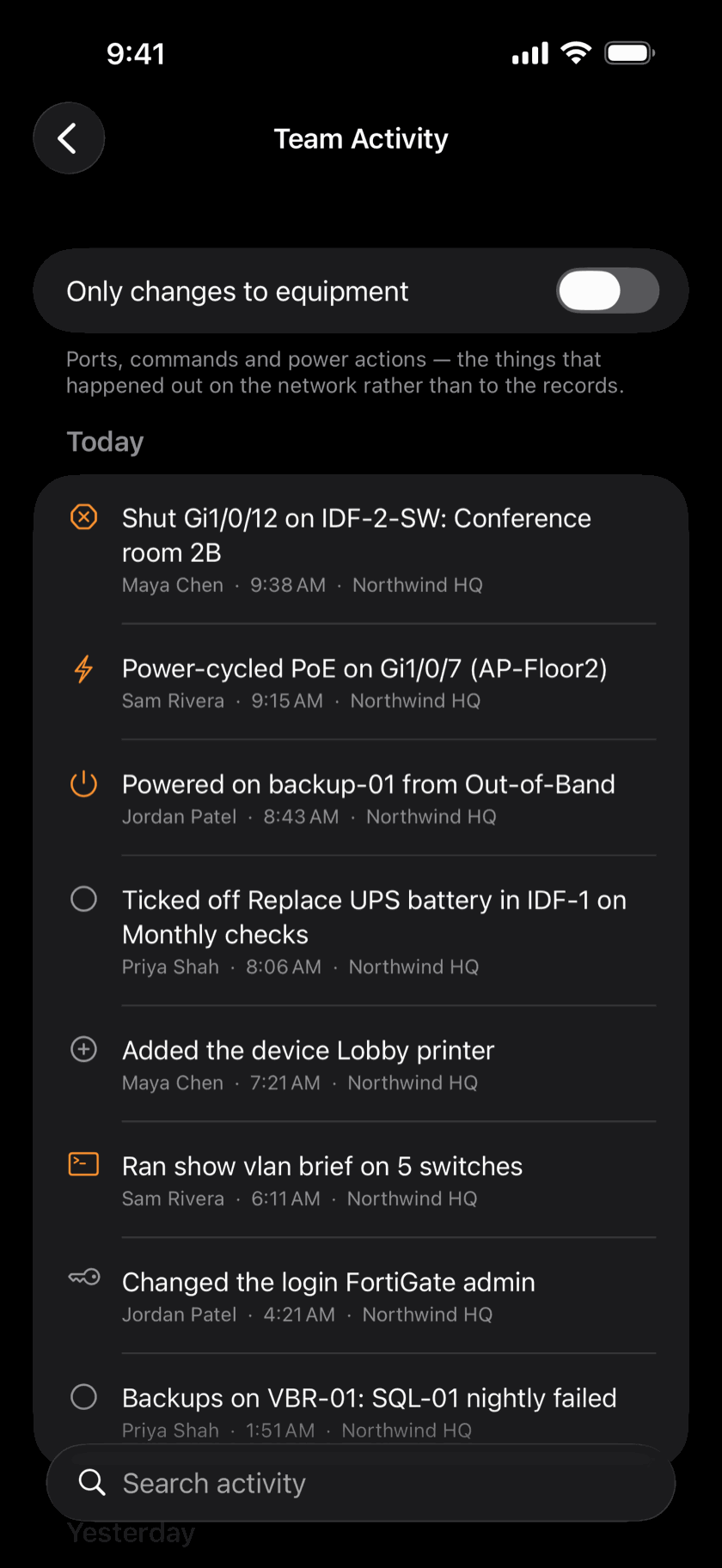
Team ActivityWho changed what, and every port shut or server powered on.
✓
Monitors the team watchesWhoever has the app open runs the checks; everyone hears.
✓
Leaving takes it with themRemove someone and the team's data is deleted from their phone.
Payment is charged to your Apple ID. A subscription renews automatically unless it is cancelled at least 24 hours before the end of the current period; manage or cancel it in your Apple ID settings. Cancel during the free month and you pay nothing. Change size through the App Store: a bigger size starts right away and Apple refunds the unused part of the current period, while a smaller size starts at the next renewal and nobody already in a team is removed. If a subscription ends, the team goes read-only for 30 days and a payment at any point restores it; after that it winds up. Your own sites always stay on your phone. See the Terms of Use and Privacy Policy.
What a team shares
Filing a site under the team is what shares it.
Sites and their devicesAddresses, ports, protocol settings, notes, tags and the folders they're filed in.
Logins the devices useShared device logins and Passwords entries at a team site, encrypted end to end.
Verified server identitiesThe SSH key an owner or admin verified, which every phone checks the server against.
Files, photos and task listsAnything filed under a team site or one of its devices.
IPAM, port maps and topologyThe team's IP plan, and which port everything is on.
Team monitors, watches and commandsChecks and saved commands filed under the team.
Activity and rolesWho changed what, and who can change what.
What stays on your phone
Whatever teams you're in.
Personal in Passwords and FilesRefused at send time, not merely unshared.
Personal device loginsYour own domain account, even on a team device.
SSH host-key trustEach phone approves a server's key for itself. The team shares only the keys an owner or admin verified.
Saved configsA running config quotes communities and hashes in plain text.
Anything filed under no teamCommands, monitors, watches and subnets you keep to yourself.
Tool history, favorites and settingsNever synced to anyone.
// Screenshots
See it in action
Ask the AINew in 1.4. Try it free; Pro and Team plans add more.
Ask the AI
It reads your devices first, then tells you what it found.
Face ID before a change
By default, and always for high-risk changes.
Connect your AI app
Claude, ChatGPT, Cursor or any MCP client, with a one-time code.
Everyday toolsThe ones you reach for every day, on any network.
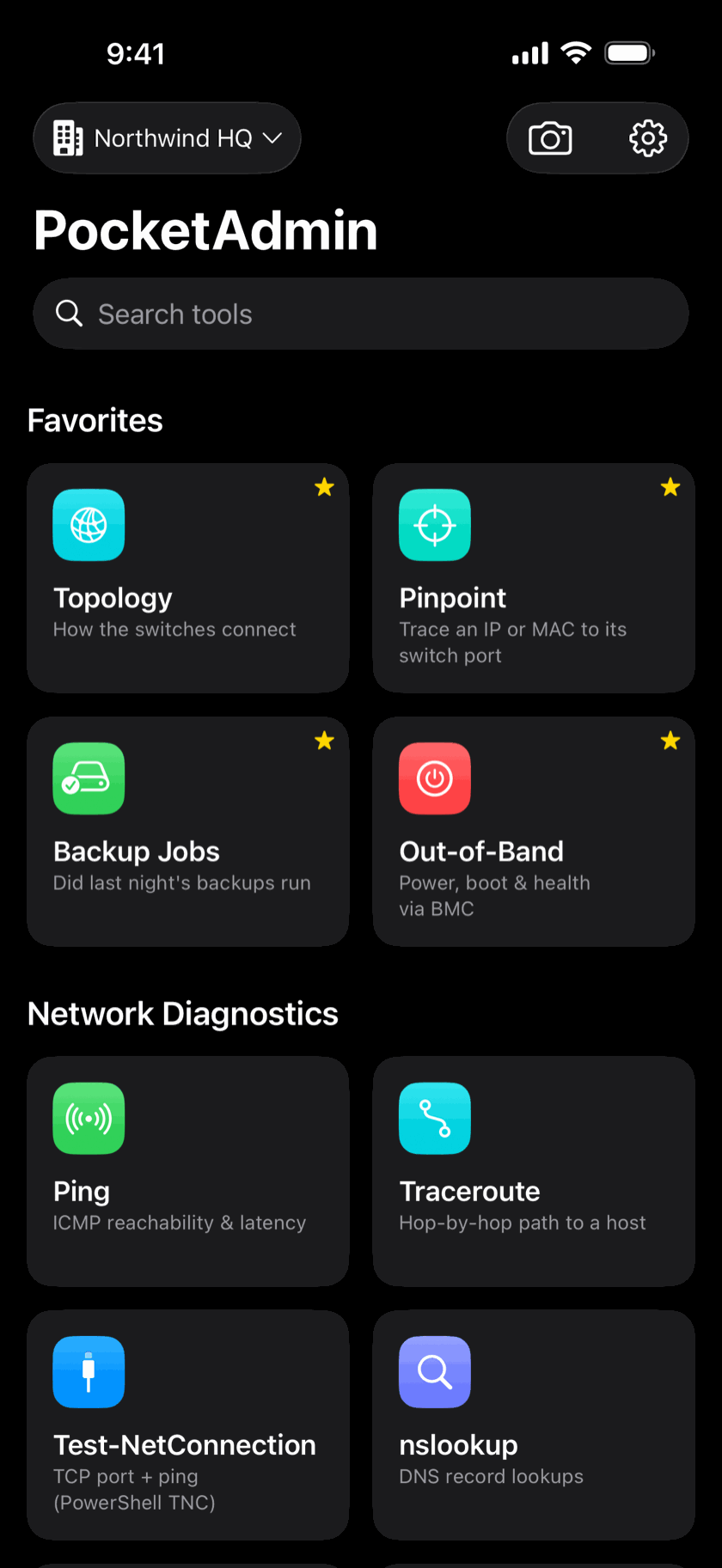
Every tool, one grid
60+ tools in categories, your favorites pinned at the top, and a search that finds any of them.
A real terminal
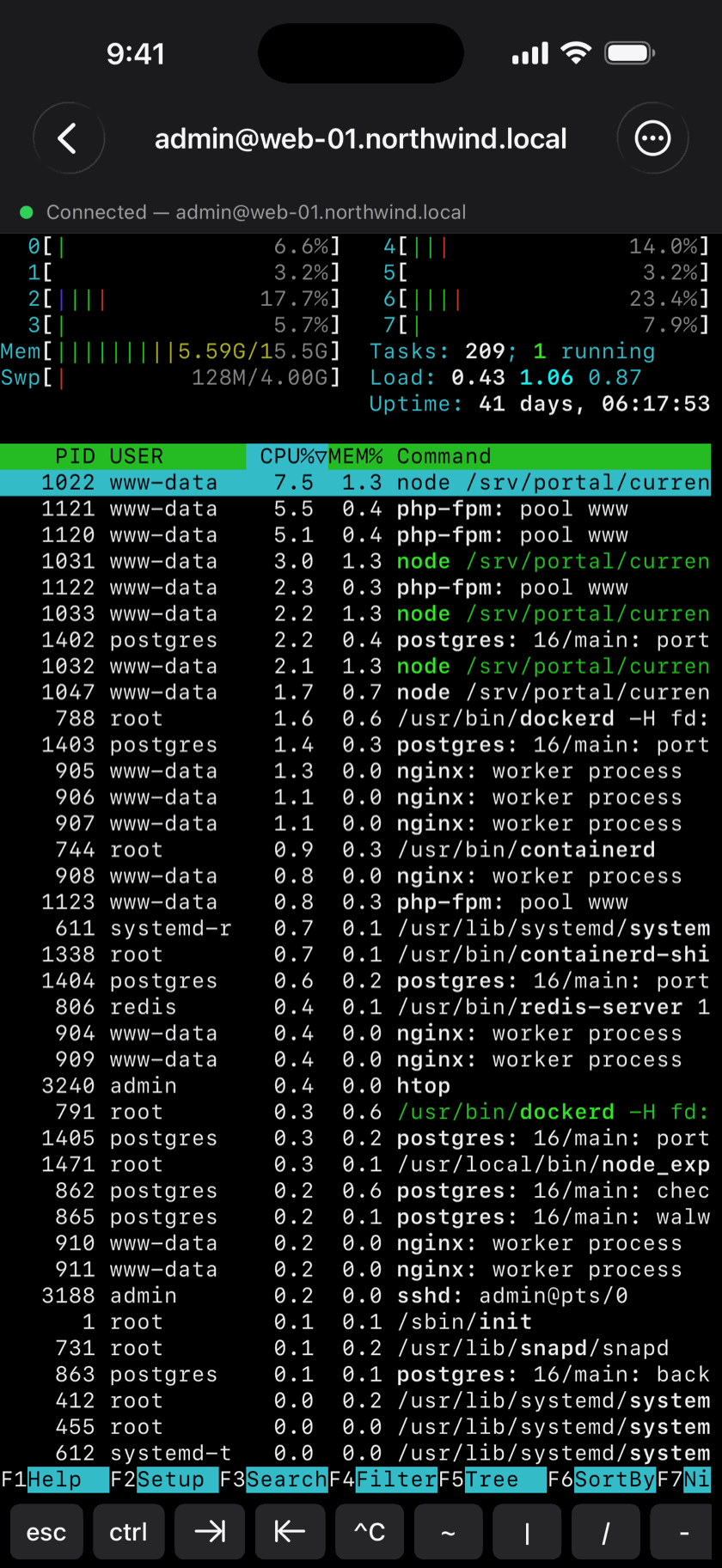
A full SSH terminal that runs vim, htop and tmux, with a key bar for esc, ctrl, tab and pipes.
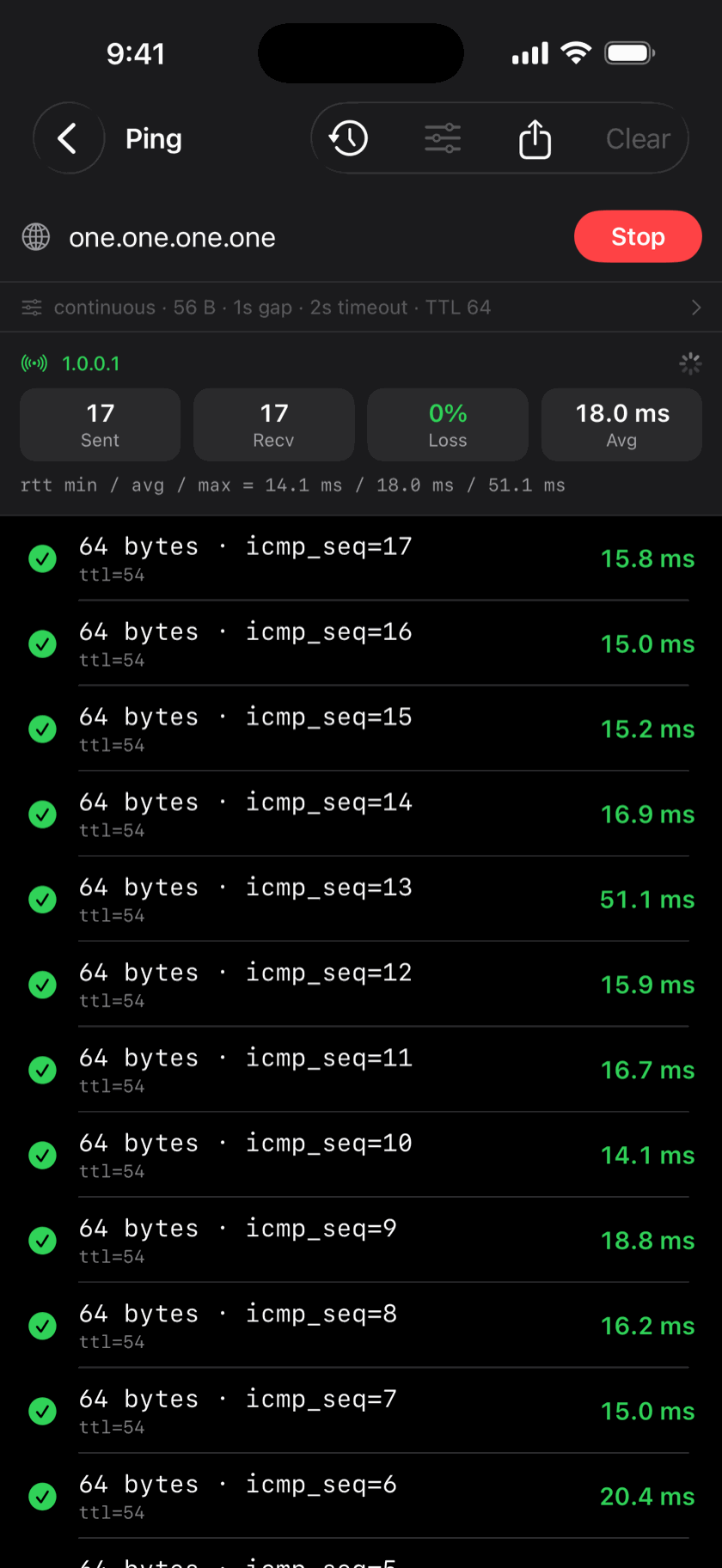
Ping, the way you expect
Live replies with loss, min, average and max, and the packet size, interval and TTL you choose.
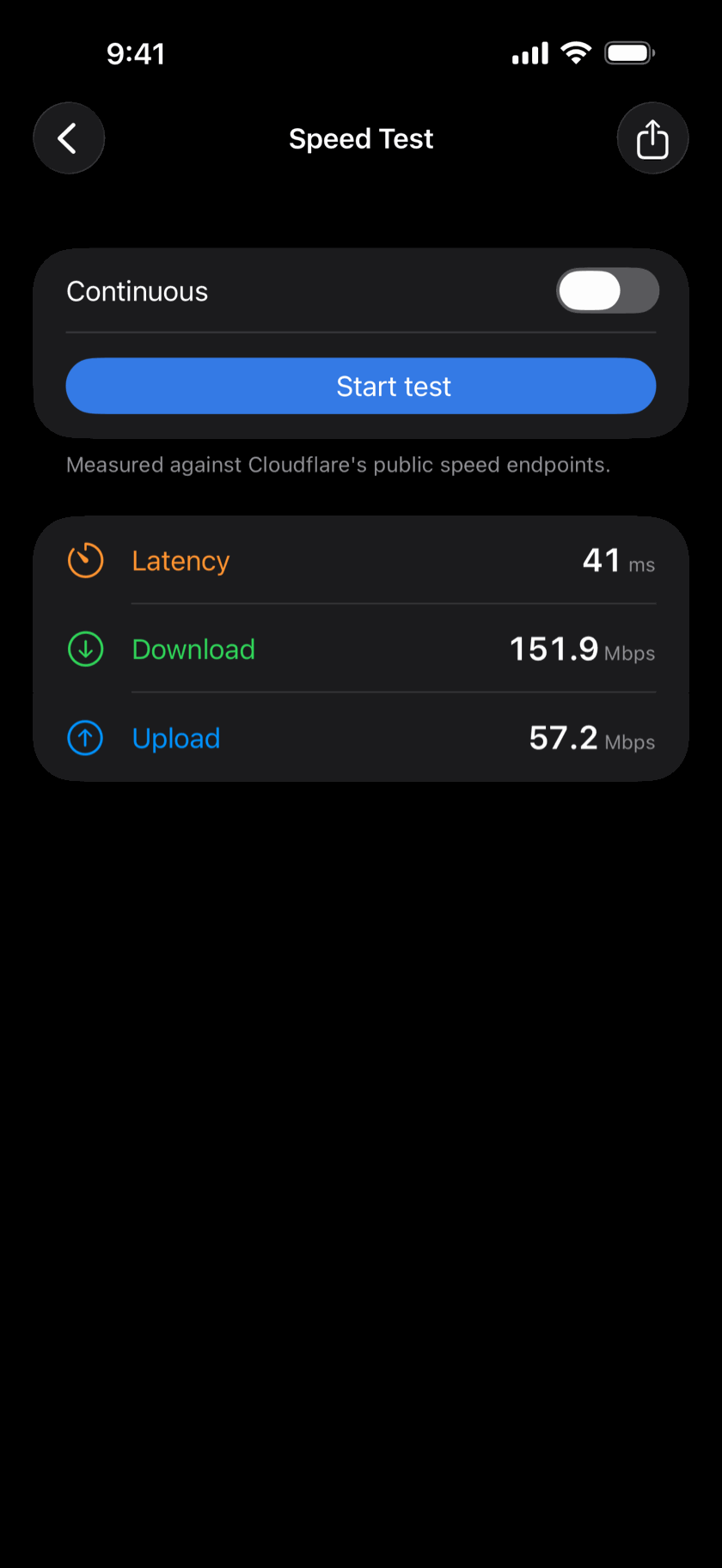
Speed Test
Latency, download and upload in one tap, measured against Cloudflare.
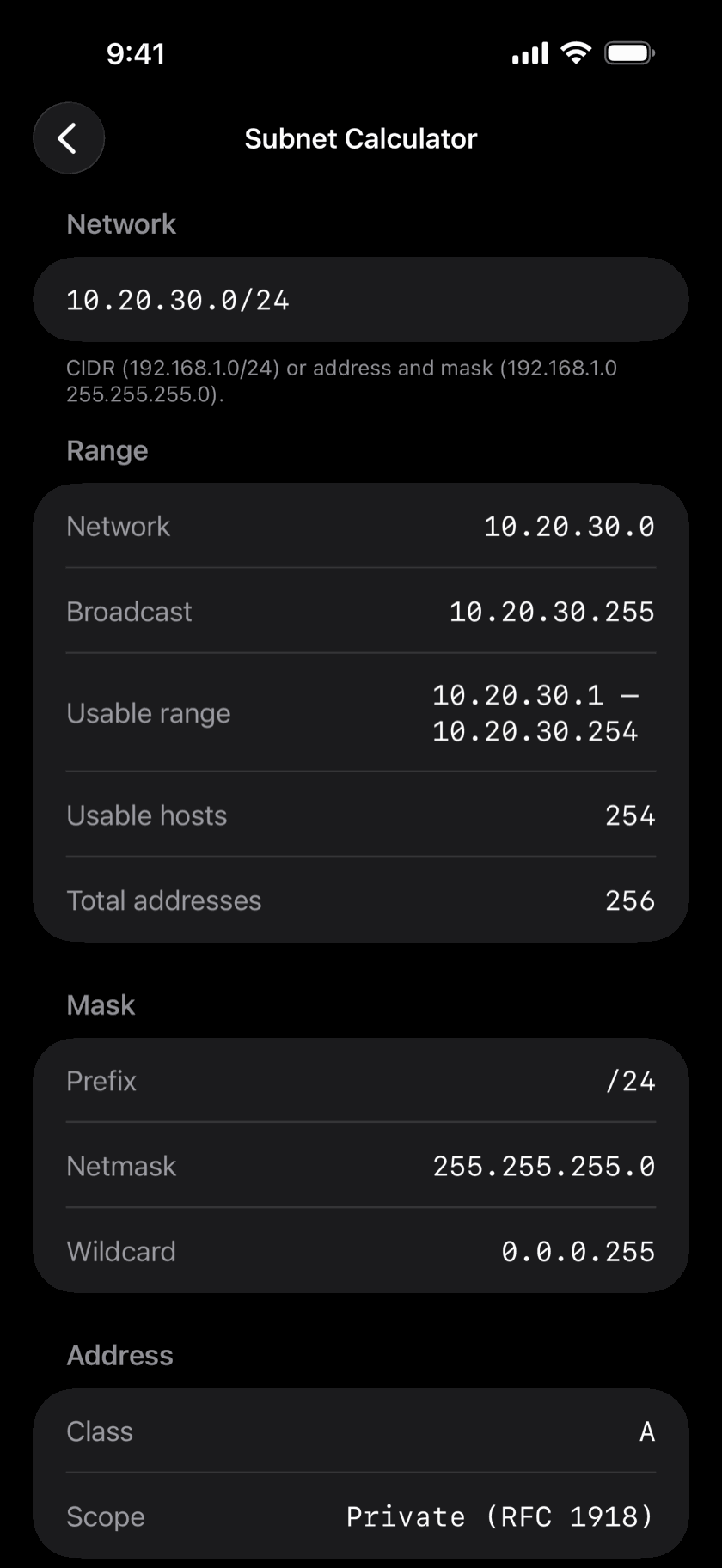
Subnet Calculator
Network, broadcast, usable range, masks and scope for any CIDR. Tap a value to copy it.
Know when something goes down
Watch websites, ports, ping, DNS and SNMP values, with a history bar and an alert when one changes state.
Servers, switches and your teamFor the network you look after.
See how it's all wired
Topology draws your network's map from what the switches report over LLDP and CDP, with ports, link speeds and spanning-tree state.
Find any port in seconds
Type an IP, a hostname or just the last four characters of a MAC, and Pinpoint names the switch port it was last seen on.
Your whole team, in sync
Share sites, devices and passwords with your team through iCloud, and see who changed what in the team's activity history.
Every server, even when it's down
Power, boot and health through iDRAC, iLO and other management controllers.
Did last night's backups run?
Veeam, Proxmox, Nutanix, Synology and more on one screen, and a failed job says why.
// Questions
Questions
What is PocketAdmin?
PocketAdmin is an iPhone and iPad app for IT admins, MSP technicians and homelabbers. You save your switches, firewalls and servers once, and 60+ free tools pick them up: SSH, port maps, topology, out-of-band power, hypervisors, backup checks and monitoring. Its AI does the legwork on those devices, and you make the call.
Does the AI see my passwords?
No. PocketAdmin keeps your logins in the iOS Keychain and signs in to your devices for the AI, then hands back only the result. The AI never sees a password, SSH key or API token. PocketAdmin also hides the secrets it recognizes in what your devices print.
Can the AI change things on its own?
Only on devices you've set to Look & Change; a new device starts Off. Commands that only read run straight away. Every change shows you the exact command and waits for your Face ID by default, and high-risk changes always ask. Activity shows the commands it ran.
Which AI does it use?
The AI built into PocketAdmin works with no setup, and anyone can try it free each month. With Pro, you can also use Apple's on-device model, your own API key, or a model on your own hardware, and connect Claude, ChatGPT or Cursor through PocketAdmin's MCP server to the devices you choose, under the same rules.
Is PocketAdmin free?
Every tool is free, with no account and no ads, and anyone can try the AI free each month. Pro adds a bigger allowance, your own models and connected apps, at $9.99 a month through December 31.
What gear does it work with?
Anything you can reach over SSH, SNMP or HTTPS: switches and firewalls from the major vendors, Linux and Windows servers, Proxmox, vSphere and Nutanix hosts, iDRAC, iLO and XCC over Redfish, and backup jobs from Veeam, Proxmox, Nutanix, Synology and Rubrik. Ping and port checks need only an address.
// Support
Help and feedback
Email us
Questions, a bug, or a device that won't talk to the app: tell us which tool and what you saw.
In the app, open Settings → Feature Requests. Post an idea, vote for the ones you'd use, and see what's planned and what shipped.
Subscriptions and refunds
Manage or cancel Pro or a Team plan in the Settings app on your iPhone or iPad (not PocketAdmin's own Settings), under your name → Subscriptions. Refunds are handled by Apple at reportaproblem.apple.com.
Privacy and terms
What the app stores, what a team shares and what we never see: Privacy Policy. The rules for using it: Terms of Use.
Available now on iPhone and iPad
Free on the App Store for iPhone and iPad, iOS and iPadOS 17 or later. Every tool is included, and anyone can try the AI free each month.
 PocketAdmin The source of truth for every network you run.
 On a computer? Scan with your iPhone or iPad camera.